
The Expanded Attack Surface of Hybrid SAP Landscapes
SAP cloud migrations expand an organization’s attack surface by moving from isolated on-premises systems to more complex, interconnected hybrid environments. While migrating to RISE with SAP, SAP Business Technology Platform (BTP), and SaaS solutions drives business agility, it could also introduce potential lateral movement vectors that can bypass traditional perimeter defenses. Threat actors do not need to break through corporate firewalls when they can exploit misconfigured trust relationships, exposed trace logs, and shared cloud credentials to move freely between on-premises and cloud instances.
To demonstrate these cross-perimeter attacks, CTO JP Perez-Etchegoyen, Lead Offensive Security Researcher Pablo Artuso, and Senior Sales Engineer Hector Espinosa recently presented Beyond the Perimeter: Managing the Expanded Attack Surface of SAP Cloud Migrations, the fourth episode of our Hacking & Defending SAP Applications docuseries.
Key Takeaways
- Firewalls No Longer Protect SAP Data: While relying solely on firewalls left critical blind spots in the past, the risk has escalated significantly today. Hybrid architecture creates connective bridges (such as SAP Cloud Connector and RFC destinations) that threat actors traverse once an initial foothold is established.
- Insecure configurations can expose sensitive data: Enabling verbose diagnostic tracing (such as Cloud Connector Tunnel Traffic Trace) can write Base64-encoded administrative credentials directly to readable log files.
- Trust Relationships Can Be Weaponized: Compromising an on-premises S/4HANA or ERP system allows attackers to abuse established SM59 destinations and communication arrangements to provision backdoor accounts in SAP BTP.
- Subaccounts Are Not Hard Security Boundaries: Web application flaws (e.g., Command Injection in BTP apps) expose environment variables (VCAP_SERVICES), enabling attackers to harvest plaintext service credentials and pivot across subaccounts to internal databases.
The Hybrid SAP Reality: Why Traditional Perimeter Controls Fail
Traditional perimeter security fails in modern SAP environments because hybrid cloud connectivity turns external endpoints into internal gateways.
In legacy architectures, enterprise resource planning (ERP) systems resided behind corporate firewalls. Security teams relied on network segmentation to keep core business logic safe. Today, an enterprise SAP ecosystem spans multiple operational layers:
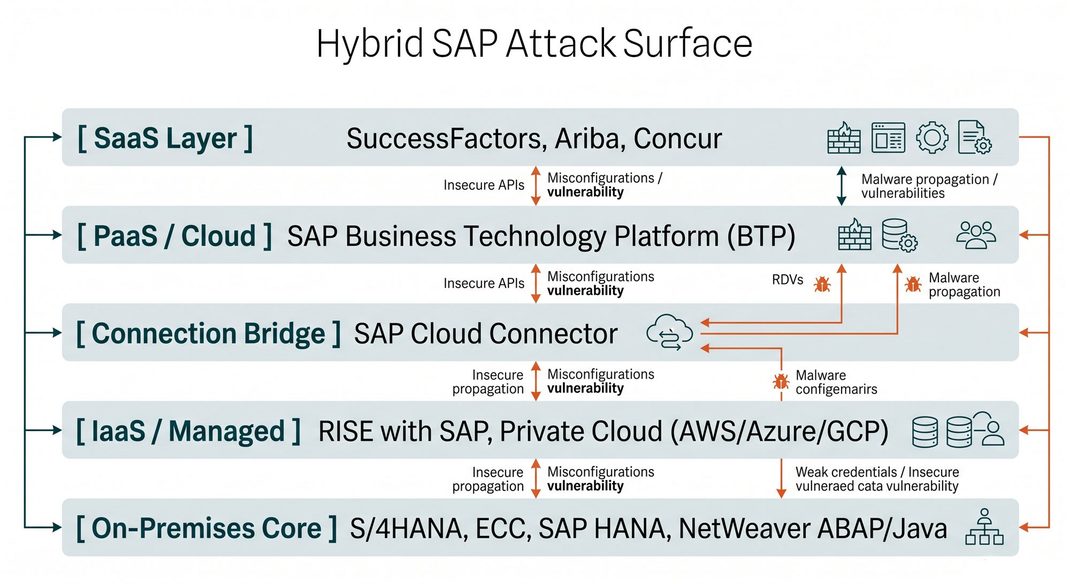
When organizations execute S/4HANA transformations or transition to RISE with SAP, they create tight integration flows between these layers. Threat actors target the integration protocols, authentication tokens, and diagnostic configurations connecting these environments rather than attacking hardened application cores directly.
Research from Onapsis Research Labs shows threat actors weaponize newly disclosed vulnerabilities in as little as 72 hours. To defend these hybrid environments, security teams must understand how attackers execute lateral movement across cloud and on-premises topologies.
Attack Vector 1: Cloud Connector to On-Premises
Attackers pivot from cloud connectors to on-premises core systems by extracting Base64-encoded credentials from diagnostic logs and invoking dangerous ICF services.
The SAP Cloud Connector acts as a reverse-invocation proxy connecting SAP BTP cloud applications to on-premises systems. Because it establishes outbound secure tunnels, it avoids opening inbound firewall ports. However, administrative misconfigurations within the Cloud Connector create severe risk.
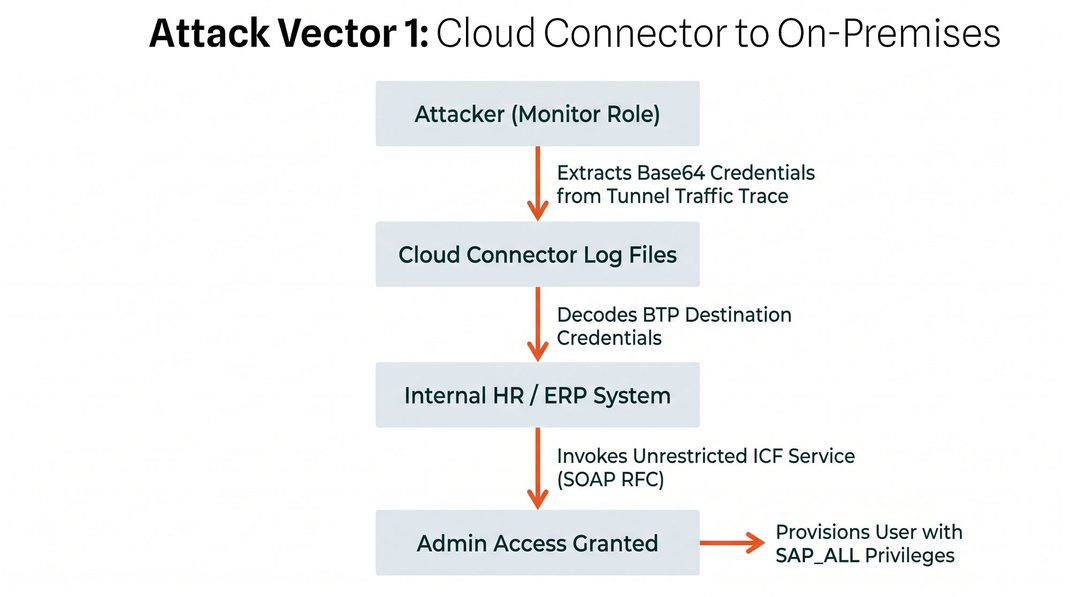
The Exploit Chain
- Trace Configuration Exposure: An administrator enables verbose diagnostic tracing (specifically the Tunnel Traffic Trace) in SAP Cloud Connector during troubleshooting.
- Credential Extraction: A user with a low-privileged monitor or support role accesses log files. The trace logs record HTTP/REST payloads passing to internal systems, including Base64-encoded HTTP Basic Authentication headers.
- Internal Gateway Targeting: The attacker decodes the Base64 string to reveal cleartext administrative credentials used by the BTP destination.
- Service Abuse: The attacker connects directly to the internal application server and locates activated Internet Communication Framework (ICF) services. By calling the SOAP RFC service, the attacker executes remote function calls to create a new dialog user with full SAP_ALL administrative authorizations.
Remediation & Hardening Guide: Securing SAP Cloud Connector
To mitigate Cloud Connector credential exposure, implement the following security controls:
Prerequisites
- Administrative access to SAP Cloud Connector Management Console.
- Authorization to modify ICF service nodes in transaction SICF on target ABAP systems.
Step-by-Step Actions
- Disable Diagnostic Tracing: Open the Cloud Connector console, navigate to Tools > Trace, and ensure Tunnel Traffic Trace is unchecked. Enforce a strict “four-eyes principle” (dual-authorization) for trace enablement.
- Apply Least-Privilege Scoping: Review BTP destinations in the SAP BTP Cockpit. Ensure service account users specified in destinations hold minimal authorizations scoped strictly to required remote function modules (RFCs).
- Deactivate Insecure ICF Services: Log into the on-premises system, run transaction SICF, locate node /sap/bc/soap/rfc, and deactivate the service if not explicitly required by business operations.
- Configure Explicit Access Control Lists (ACLs): In Cloud Connector under Access Control, restrict allowed resources to specific function modules rather than granting open access to all RFC endpoints (/ or ALL).
Validation Step
Run transaction SM20 (Security Audit Log) or execute an automated scan via Onapsis Assess to verify that SOAP RFC calls from external IP ranges are blocked and logged.
Attack Vector 2: On-Premises-to-Cloud Pivoting via Trust Relationship Abuse
Attackers pivot from on-premises systems into cloud environments by abusing stored RFC destinations and over-privileged communication arrangements.
Organizations frequently assume that an attacker compromising an on-premises system cannot reach cloud environments like SAP BTP. However, applications routinely maintain pre-established trust relationships via SM59 RFC destinations and OAuth client configurations.
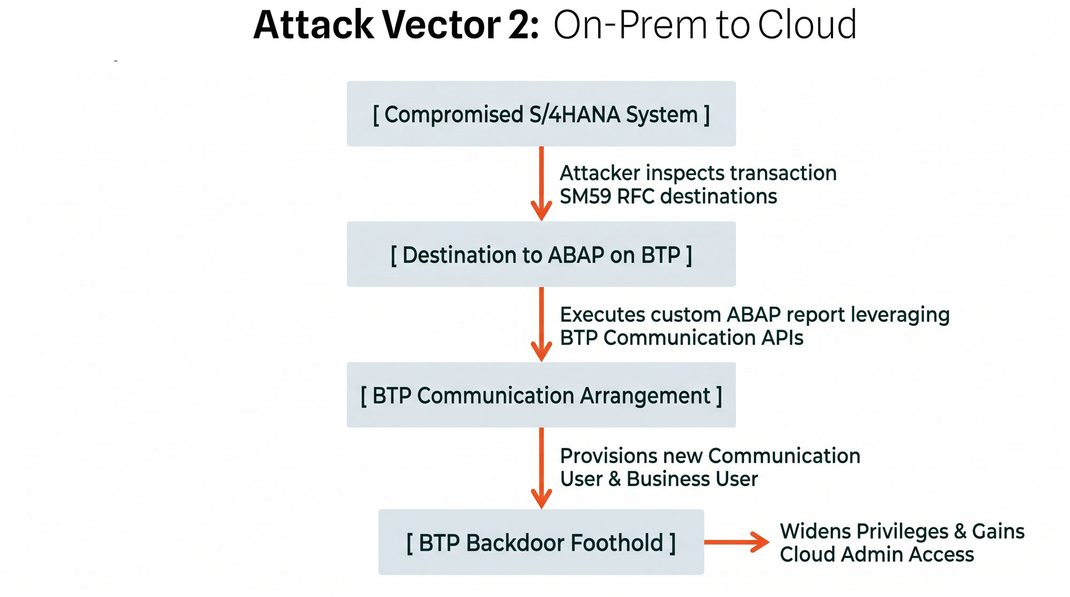
The Exploit Chain
- Initial On-Premises Compromise: An attacker gains execution privileges on an internal S/4HANA or ERP system (e.g., via custom code vulnerabilities or stolen credentials).
- Destination Inspection: The attacker executes transaction SM59 to identify active HTTP/RFC connections pointing to ABAP on SAP BTP or other cloud tenants.
- Configuration Drift Abuse: The connected cloud communication user possesses over-assigned communication arrangements due to testing artifacts left in production.
- Cloud Backdoor Provisioning: The attacker deploys a custom ABAP report that executes REST calls against BTP administrative APIs using the stored destination token. The script creates a new BTP communication user and a business user with elevated privileges, establishing an unmonitored backdoor in the cloud.
Remediation & Hardening Guide: Securing Integration Destinations
Secure inter-system connections against credential misuse by applying these controls:
Step-by-Step Actions
- Eliminate Static Stored Passwords: Replace hardcoded user passwords in SM59 destinations with Principal Propagation using X.509 mutual TLS certificates or OAuth 2.0 SAML Bearer assertions.
- Implement Transport & Code Security: Deploy Onapsis Control within your transport management workflow (SAP TMS, ChaRM, Rev-Trac) to scan all custom ABAP code before migration, blocking unauthorized API calls to external cloud tenants.
- Audit Cloud Communication Arrangements: Log into SAP BTP Cockpit, navigate to Communication Management > Communication Arrangements, and revoke unused communication scenarios (such as user management APIs).
Validation Step
In SAP BTP Cockpit, review the Change Documents log under User Management to confirm that no unauthorized communication users or role collections were created during the past 30 days.
Attack Vector 3: Cloud to On-Premise Exploitation & Cloud Foundry RCE to Internal HR Data Exfiltration
Attackers exploit web application flaws in BTP apps to extract shared cloud service credentials and exfiltrate on-premises HR data across subaccount boundaries.
A common architectural misconception is treating SAP BTP subaccounts or Cloud Foundry spaces as isolated security boundaries. When multiple cloud applications share underlying connectivity and destination services, a vulnerability in a low-criticality app can compromise high-value enterprise databases.
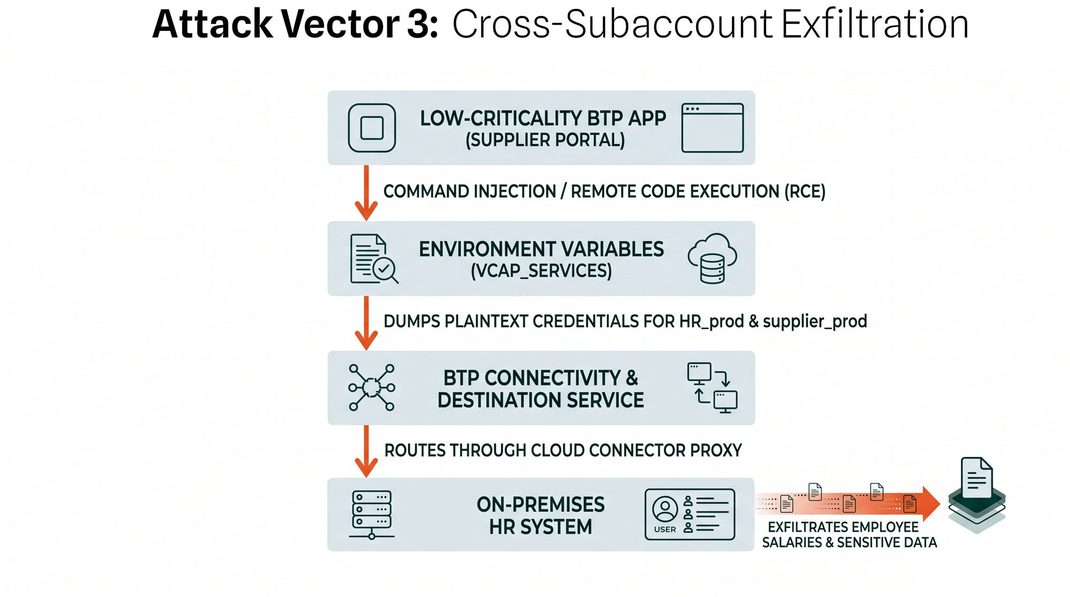
The Exploit Chain
- Application Vulnerability Exploitation: An external attacker identifies a Remote Code Execution (RCE) flaw (such as a command injection vulnerability in a UI5 or Node.js application) running in Cloud Foundry BTP.
- Environment Variable Extraction: By executing OS commands within the container, the attacker inspects the VCAP_SERVICES environment variable. In Cloud Foundry, VCAP_SERVICES contains JSON objects storing API keys, tokens, and plaintext passwords for bound destination and connectivity services.
- Cross-Service Credential Harvesting: The shared destination service contains credentials for both the low-risk application (supplier_prod) and high-value production systems (HR_prod).
- Data Exfiltration: Using the harvested HR_prod service token, the attacker routes queries through the internal proxy established by Cloud Connector, dumping employee compensation data, bank details, and personal records directly from the internal database.
Remediation & Hardening Guide: Isolating BTP Services & Applications
Prevent cross-app credential leakage and subaccount pivoting with these defensive steps:
Step-by-Step Actions
- Enforce Subaccount Security Boundaries: Separate high-value business applications (HR, Finance) into dedicated BTP subaccounts with independent Destination Service instances. Do not share single destination service bindings across unrelated applications.
- Scan Custom BTP Code for Security Flaws: Integrate DevSecOps code testing into your CI/CD pipelines (Azure DevOps, GitHub Actions, SAP Cloud ALM) to detect command injection, SQL injection, and hardcoded secrets before deployment.
- Restrict Cloud Connector Resource Paths: Configure granular Access Control Lists in Cloud Connector. Specify exact URL paths (e.g., /sap/bc/gui/sap/its/supplier_app/*) rather than granting blanket domain access (/).
Validation Step
Inspect Cloud Connector audit logs (ljs_trace.log) to confirm that requests targeting unauthorized backend URL paths receive HTTP 403 Forbidden responses.
How Onapsis Delivers Defense-in-Depth Across Hybrid SAP Topologies
The Onapsis Platform delivers unified, automated visibility, vulnerability management, threat detection, and code security across on-premises, RISE with SAP, and BTP landscapes.
Securing complex hybrid environments requires moving beyond point-in-time manual checks. The Onapsis Platform addresses security and compliance across the entire lifecycle:
- Onapsis Assess: Delivers continuous vulnerability management across 6,000+ checks spanning ABAP, Java, HANA, BTP, Cloud Connector, Web Dispatcher, and SuccessFactors. Automatically validates whether manual SAP Security Notes and workarounds were correctly applied.
- Onapsis Control: Performs static, dynamic, and interactive application security testing across custom ABAP, Fiori, SAPUI5, HANA XSJS, and BTP Node.js code. Features in-IDE “One-Click Fix” automated remediation to clean code before deployment.
- Onapsis Defend: Operates as a real-time application intrusion detection system (IDS) featuring 2,500+ specialized SAP threat detection rules and 574+ exploit signatures. Delivers zero-day pre-patch protection rules ~120 days before public SAP Security Notes.
- Onapsis Research Labs: The premier threat research team credited with discovering over 1,000 zero-day vulnerabilities in business-critical applications, serving as a direct threat intelligence feed to US CISA, German BSI, and SAP engineering. According to official SAP Security Researcher Acknowledgments, Onapsis researchers consistently lead the industry in responsible vulnerability disclosure.

About the Author

About the Author
