Introduction to Hash Cracking
The Bottom Line: SAP systems frequently prioritize backward compatibility, leading to the storage of weak, easily crackable password hashes (such as MD5-based CODVN B) alongside stronger modern standards. Attackers exploit this by extracting these legacy hashes from database tables like USR02 and USH02 to compromise user credentials—even if the user believes they have a strong password.
The Fix: To neutralize this threat, security teams must not only rely on strong passwords but actively sanitize their database. This requires setting the profile parameter login/password_downwards_compatibility to disable the generation of weak hashes and removing existing legacy hash values from the system.
How Do You Crack a Hash?
To crack a hash, security professionals and threat actors use automated tools to guess the original plaintext password that created the cryptographic hash. Because hashes are designed to be one-way functions, you cannot ‘decrypt’ a hash; instead, you must crack a hash by rapidly generating millions of guesses (using brute force, dictionary wordlists, or rainbow tables) and comparing the outputs until a match is found.
Password Storage in SAP Netweaver ABAP
SAP systems produce and store different types and versions of hashes according to its configuration. Furthermore, legacy and insecure values can be kept back to provide retrocompatibility, which is important because depending on the configuration parameters, it’s possible to have weak hashes stored in the SAP system database that can make it easier for a threat actor to obtain highly critical information about the user’s credentials.
Database Tables
SAP Netweaver ABAP stores passwords mainly in the database table USR02, also keeps user historical values in the tables USH02, USH02_ARC_TMP, and last but not least in table USRPWDHISTORY.
Although USR02 contains the active passwords, analyzing all the hashes can provide hints or partial passwords that can lead to mutate input test data or improve an existing dictionary.
Hash Functions and Formats
SAP systems implement several mechanisms to generate hashes and multiple values can be stored based on profile parameters configurations.
The field CODVN (Code Version of Password Hash Algorithm) in table USR02 represents the algorithm that is active for an specific registry, the possible values and hashing methods are:
| CODVN Value | Description |
| B | MD5 based function, limited to 8 uppercased characters ASCII encoded |
| D | MD5 based function, limited to 8 uppercased characters UTF8 encoded |
| F | SHA1 based function with fixed SALT, 40 characters UTF-8 encoded |
| H | SHA1 based function with random SALT, 40 characters UTF-8 encoded |
Each specific hash value has its own column in the aforementioned tables, and multiple hashes can coexist and be validated according to the SAP system configuration.
For each tables CODVN “B”/”D” is stored in the column “BCODE”, CODVN “F” is stored in column “PASSCODE” and CODVN “H” is stored in the column PWDSALTEDHASH.
Two other CODVN values are possible “G” and “I”, which is basically that multiple hashes are going to be generated and stored. CODVN “G” will produce “F” and “B”, and CODVN “I” will produce the hashes “H” “F” and “B”.
The password hashes that are going to be generated, stored and validated when the user logs in is handled by the profile parameter login/password_downwards_compatibility (see https://help.sap.com/doc/saphelp_nw74/7.4.16/en-us/4a/c3f18f8c352470e10000000a42189c/frameset.htm for more information about this parameter).
Password Cracking in SAP Systems
To be able to crack passwords, first we need to obtain password hashes. If we have access directly to the database, this task is straightforward, but in SAP systems we have other options.
Obtaining Hashes in SAP systems
If we don’t have direct access to the database, it’s possible to retrieve the password hashes via specific transactions or remote function calls (RFC).
Some helpful transaction codes to export database records are SE16 and DBACOCKPIT, both transactions permit to explore database tables and extract full values.
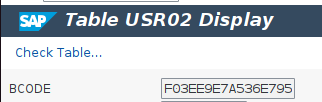
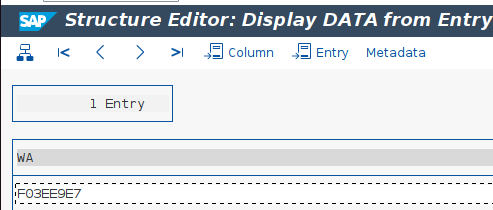
If these transactions aren’t available, the RFC function RFC_READ_TABLE can provide partial hashes. This method won’t provide the full hash values, but some tools can use these incomplete values to get some results. It’s also important to highlight that this RFC function is remote enabled, which means that it can be executed remotely.
The image below shows an example of the retrieved partial value of the previous hash.
Password Cracking Tools and Recommendations
Password cracking allows for the recovery of lost or compromised passwords. Due to the inherent properties of cryptographic hash functions, the only way to perform this task is by systematically guessing values until a match is found. If you are attempting to crack a hash within an SAP environment, this is typically achieved by brute-forcing values.
While brute-forcing every possible length and character combination works, it is rarely the most performant option. Instead, security teams rely on pre-created wordlists or rainbow tables—which, in simplified terms, are pre-calculated lists of hash values and their corresponding plaintexts. (Note: Rainbow tables are not a valid choice if random salts are used in the hash calculation process).
Often, a mix of these techniques is the most effective approach, combining wordlists with known values or mutating words into new values based on specific rule sets. It is important to mention that your success when trying to crack a hash depends heavily on the quality of your wordlist and rule generation. Knowing typical passwords or contextual words related to the organization leads to a much more efficient recovery process.
Weak or partial hashes can produce results that are inaccurate or outdated, but they can still provide valuable hints about the password domain. For example, imagine a user has the password “Password1234”. If legacy CODVN B hashes are generated in the SAP system, it will be much quicker to crack, but the result will read “PASSWORD” instead of the real user password. At the very least, this provides a good starting point to build out dictionaries and rules to test the stronger, active hashes.
There are currently two de facto standard tools that allow this password recovery task to be performed. We will exemplify their use below: John the Ripper and Hashcat.
Cracking SAP System Hashes with JohnTheRipper
JohnTheRipper provide several versions and Jumbo version is the best option if we want to crack SAP system generated hashes, because it also provides some scripts to format input files like sap2john.pl which explains how to download as spreadsheet the hashes and converts to the input expected by john binary.
The format required by older versions of JohnTheRipper is <username><space-padding-to-40>$<hash> for CODVN B/D/F and only the hash for CODVN H, but newer versions accept the input file without space padding up to 40.
The commands to be executed in order to start the recovery process are:
| For CODVN Bjohn –format=sapb –wordlist=wordlist_file hashes_file For CODVN Fjohn –format=sapg –wordlist=wordlist_file hashes_file For CODVN Hjohn –format=saph –wordlist=wordlist_file hashes_file |
Cracking SAP System Hashes with Hashcat
Hashcat allows not only to crack full hashes, but it’s also possible to crack partial hashes obtained via RFC_READ_TABLE.
For CODVN B/D/F the file format required is <username>$<hash>, for CODVN H only the hash is required.
It’s possible to execute Hashcat with different attack modes. The simplest way is the Wordlist mode, which basically compares hashes produced from that list with the ones obtained from the database. However, other modes are available, like brute force every character or combining word lists with rules.
For the sake of the example Hashcat can be executed as follows to attempt to recovery passwords based on word lists:
| For CODVN Bhashcat -a 0 -m 7700 hashes_file wordlist_file For CODVN Fhashcat -a 0 -m 7800 hashes_file wordlist_file For CODVN B with partial hash from RFC_READ_TABLEhashcat -a 0 -m 7701 hashes_file wordlist_file For CODVN F with partial hash from RFC_READ_TABLEhashcat -a 0 -m 7801 hashes_file wordlist_file For CODVN Hhashcat -a 0 -m 10300 hashes_file wordlist_file |
Other methods like brute forcing or rule-based can be really slow if they lack some precise definitions or will require generating some rule sets which, without some knowledge of the password context, can be suboptimal and unsuccessful.
Conclusions and Recommendations
SAP systems based on its configuration can produce several hash versions, some of them nowadays considered weak and easy to crack.
Based on profile parameters configuration, these downgraded passwords can be considered valid when a user attempts to log in if downward compatibility is enabled.
If weak hashes aren’t being validated, the results can provide hints about real passwords that could help to improve the wordlists or rules.
Onapsis strongly recommends to deactivate the downward compatibility and remove the weak hashes in all the related tables mentioned above.
Overall, hashing is not only an interesting procedure from an attacker perspective, but it can also help infosec teams identify password reutilization or well known passwords and take actions accordingly.
Frequently Asked Questions (FAQ)
Where does SAP store password hashes?
SAP NetWeaver ABAP primarily stores active password hashes in the database table USR02. However, historical password data—which attackers can also target—is kept in USH02, USH02_ARC_TMP, and USRPWDHISTORY.
What makes certain SAP hashes easier to crack?
SAP uses different “Code Versions” (CODVN) to hash passwords. Older versions like CODVN B are extremely weak because they are limited to 8 characters, converted to uppercase, and use the MD5 algorithm. If a system is configured for backward compatibility, it will store this weak hash alongside a stronger one (like CODVN F or H). Attackers target the CODVN B hash because it is trivial to brute-force.
What is the risk of “downward compatibility”?
The profile parameter login/password_downwards_compatibility controls whether SAP generates legacy hashes for older clients. If enabled, even a complex password like “Password1234” will generate a weak CODVN B hash equivalent to “PASSWORD”. Cracking this weak hash gives the attacker a valid entry point, bypassing the strength of the original password.
Can I crack hashes without full database access?
Yes. Even without direct database access, attackers (or auditors) can use the remote function call RFC_READ_TABLE to extract partial hash values. While these values are incomplete, tools like Hashcat have specific modes (e.g., -m 7701 for partial CODVN B) designed to crack them.
What tools are best for testing SAP password strength?
The two industry-standard tools are JohnTheRipper (Jumbo version) and Hashcat.
JohnTheRipper is excellent for formatting input files using scripts like sap2john.pl.
Hashcat is highly effective for cracking both full and partial hashes retrieved via RFC.
Contact Onapsis to
Advance Your SAP Security